Recent improvements in local LLM infrastructure have enabled developers to build Retrieval-Augmented Generation (RAG) pipelines that run fully on-premise while maintaining strong separation between deterministic logic and generative reasoning. In this issue, we explore a category-aware RAG architecture implemented using ASP.NET Core MVC, PostgreSQL + pgvector, and Ollama. The system is designed for enterprise environments where privacy, traceability, and policy alignment are essential.
This implementation emphasizes three design principles:
- Deterministic Retrieval through pgvector
- Strict Context-Bound Reasoning through Ollama
- Transparent Governance through category-aware metadata filtering and inspectable context
The result is a predictable, auditable RAG workflow suitable for HR, Legal, Engineering, and Operations knowledge domains.
System Overview
The system’s workflow consists of three core components:
- Content Ingestion (Title + Category + Content)
- Semantic Retrieval + Optional Category Filtering
- Context-Bound Generation
Users add internal documentation through a web UI. The server generates embeddings through Ollama and stores all metadata and vectors in PostgreSQL.
User queries are embedded and compared using pgvector. Results are filtered by similarity and optionally by category.
The retrieved documents form a structured context block. Ollama generates a response only using that context.
If retrieval relevance is insufficient, the system returns:
“I don’t know. No relevant data found.”
The architecture maintains clean separation between deterministic components (database, embeddings, retrieval) and probabilistic components (LLM reasoning).
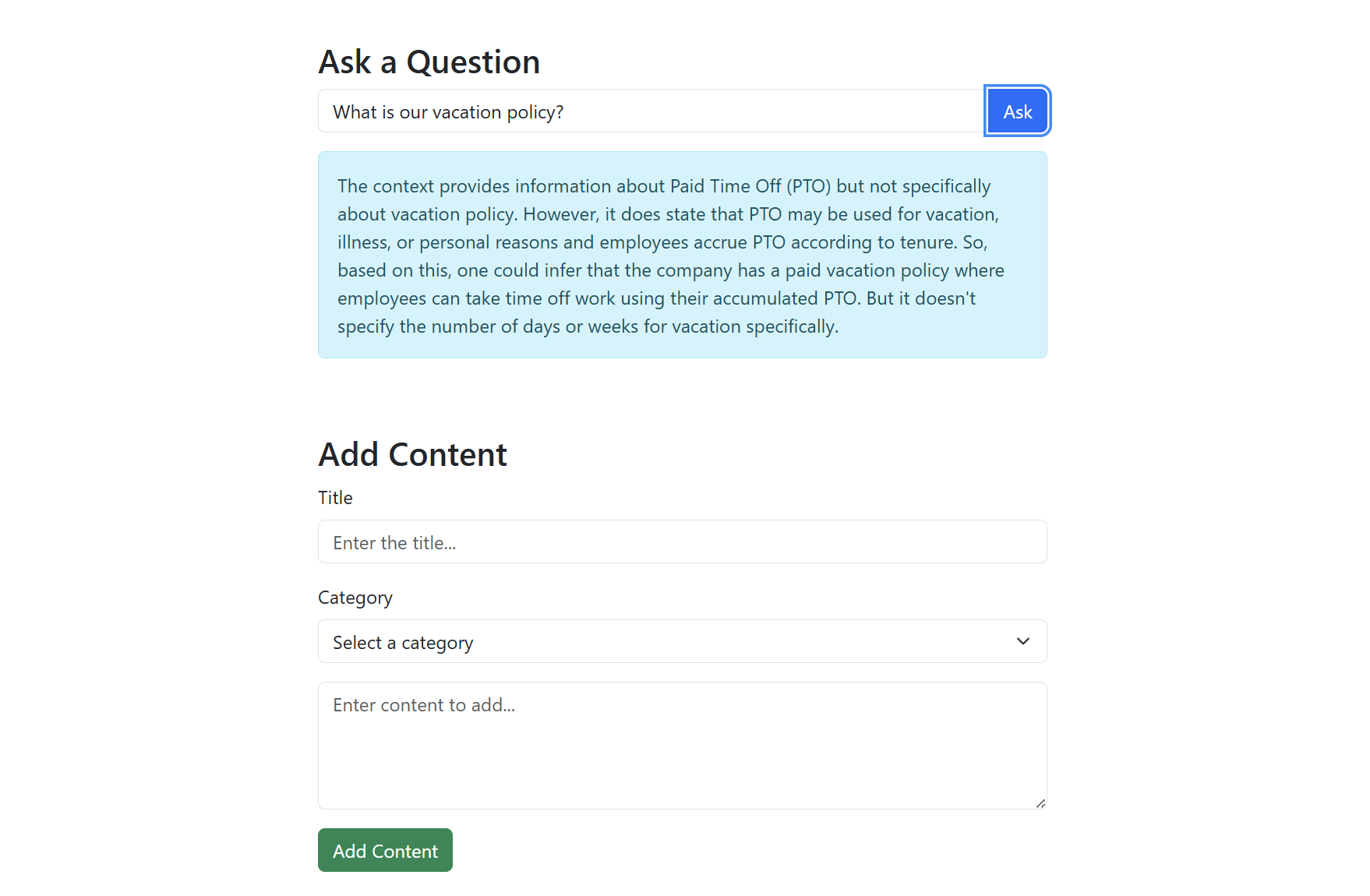
The screenshot below shows the application interface for adding content and querying the RAG system.
Architecture Diagram
The following diagram illustrates the flow of the Category-Aware Local RAG system, showing how content is ingested, retrieved, and used for context-bound generation.
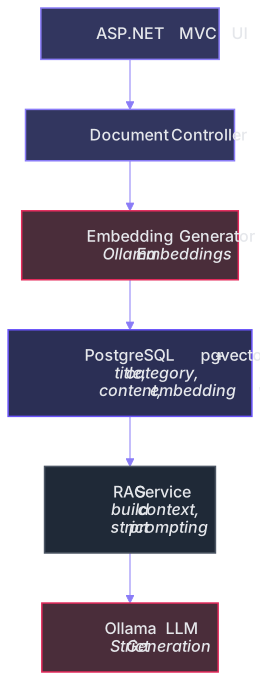
- ASP.NET MVC UI: User interface for adding content and querying.
- Document Controller: Handles content ingestion and query processing.
- Embedding Generator (Ollama): Generates embeddings for documents and queries.
- PostgreSQL + pgvector: Stores documents, categories, and embeddings for semantic retrieval.
- RAG Service: Builds context and orchestrates strict prompting.
- Ollama (LLM): Performs context-bound generation.
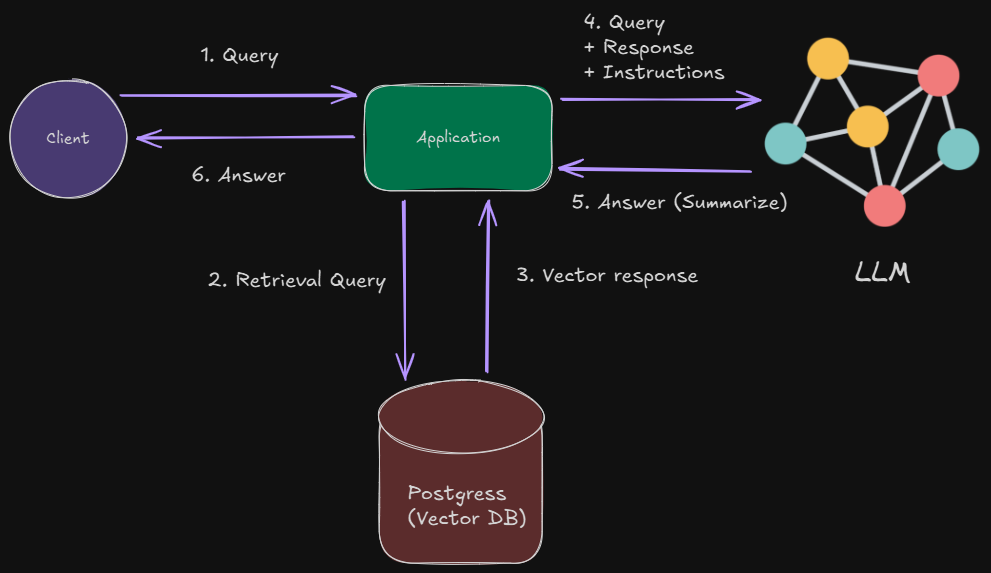
Moreover, the overall architecture of the system is displayed below:
Embedding and Storage Layer
Embedding Generator Interface
The system defines an abstraction for embedding generation, enabling future model swaps without breaking the pipeline:
public interface IEmbeddingGenerator
{
  Task<float[]> GenerateEmbeddingAsync(string text);
}
Ollama Embedding Generator
Embeddings are generated via a call to the local Ollama runtime:
public class OllamaEmbeddingGenerator : IEmbeddingGenerator
{
  private readonly HttpClient _httpClient = new();
  private readonly Uri _ollamaUrl;
  private readonly string _modelId;

  public OllamaEmbeddingGenerator(Uri ollamaUrl, string modelId = "mistral")
  {
      _ollamaUrl = ollamaUrl;
      _modelId = modelId;
  }

  public async Task<float[]> GenerateEmbeddingAsync(string text)
  {
      var requestBody = new { model = _modelId, prompt = text };

      var response = await _httpClient.PostAsync(
          new Uri(_ollamaUrl, "/api/embeddings"),
          new StringContent(JsonSerializer.Serialize(requestBody), Encoding.UTF8, "application/json"));

      var json = await response.Content.ReadAsStringAsync();
      var result = JsonSerializer.Deserialize<OllamaEmbeddingResponse>(json);

      return result?.Embedding ?? throw new Exception("Embedding generation failed.");
  }
}
This design keeps embedding generation local, deterministic, and private.
Ollama models such as mistral, nomic-embed-text, or llama3:instruct can be swapped in without architectural change.
Storage and Semantic Retrieval (PostgreSQL + pgvector)
Table Schema
A typical pgvector-enabled table looks like this:
CREATE TABLE text_contexts (
  id SERIAL PRIMARY KEY,
  title TEXT NOT NULL,
  category TEXT NOT NULL,
  content TEXT NOT NULL,
  embedding vector(4096)
);
Storing Documents
public async Task StoreTextAsync(string title, string category, string content)
{
  var embedding = await _embeddingGenerator.GenerateEmbeddingAsync(content);

  using var conn = new NpgsqlConnection(_connectionString);
  await conn.OpenAsync();

  string query = @"
      INSERT INTO text_contexts (title, category, content, embedding)
      VALUES (@title, @category, @content, @embedding)";

  using var cmd = new NpgsqlCommand(query, conn);
  cmd.Parameters.AddWithValue("title", title);
  cmd.Parameters.AddWithValue("category", category);
  cmd.Parameters.AddWithValue("content", content);
  cmd.Parameters.AddWithValue("embedding", embedding);

  await cmd.ExecuteNonQueryAsync();
}
Semantic Query + Category Filtering
The method below takes a query, optionally filtered by category, generates its embedding, retrieves the top 5 most similar documents using pgvector similarity, and returns them or a default “no relevant context” result if none are found.
public async Task<List<(string Title, string Category, string Content)>>
RetrieveRelevantText(string query, string? categoryFilter = null)
{
  var queryEmbedding = await _embeddingGenerator.GenerateEmbeddingAsync(query);

  using var conn = new NpgsqlConnection(_connectionString);
  await conn.OpenAsync();

  string sql = @"
      SELECT title, category, content
      FROM text_contexts
      ORDER BY embedding <-> CAST(@queryEmbedding AS vector)
      LIMIT 5";

  if (!string.IsNullOrEmpty(categoryFilter))
      sql = sql.Replace("LIMIT 5", "AND category = @category LIMIT 5");

  using var cmd = new NpgsqlCommand(sql, conn);
  cmd.Parameters.AddWithValue("queryEmbedding", queryEmbedding);

  if (!string.IsNullOrEmpty(categoryFilter))
      cmd.Parameters.AddWithValue("category", categoryFilter);

  using var reader = await cmd.ExecuteReaderAsync();

  var results = new List<(string, string, string)>();
  while (await reader.ReadAsync())
      results.Add((reader.GetString(0), reader.GetString(1), reader.GetString(2)));

  return results.Any() ? results : new() { ("None", "None", "No relevant context found.") };
}
pgvector’s <-> operator ensures deterministic similarity ordering.
RAG Service: Strict Context-Bound Generation
Context Packaging and Strict Prompt
The RAG service enforces grounded LLM behavior:
public async Task<object> GetAnswerAsync(string query, string? categoryFilter = null)
{
  var contexts = await _textRepository.RetrieveRelevantText(query, categoryFilter);

  string combinedContext = string.Join("\n\n---\n\n",
      contexts.Select(c => $"Title: {c.Title}\nCategory: {c.Category}\n{c.Content}"));

  var prompt = $"""
  You are a strict AI assistant.
  You MUST answer ONLY using the provided context.

  If the answer is not present, respond with:
  "I don't know. No relevant data found."

  Context:
  {combinedContext}

  Question: {query}
  """;

  var requestBody = new
  {
      model = _modelId,
      prompt = prompt,
      stream = false
  };

  var response = await _httpClient.PostAsync(
      new Uri(_ollamaUrl, "/api/generate"),
      new StringContent(JsonSerializer.Serialize(requestBody), Encoding.UTF8, "application/json"));

  var responseText = await response.Content.ReadAsStringAsync();
  return new { Context = combinedContext, Response = responseText };
}
This hard constraint ensures compliance and eliminates hallucination risk.
MVC Integration
Adding Content (Controller)
[HttpPost]
public async Task<IActionResult> AddContent(string title, string category, string content)
{
  await _repository.StoreTextAsync(title, category, content);
  return RedirectToAction("Index");
}
Asking a Question
[HttpGet]
public async Task<IActionResult> Ask(string query, string? category)
{
  var result = await _ragService.GetAnswerAsync(query, category);
  return View(result);
}
Example Razor View for Query Interface
<form method="get" action="/Document/Ask">
  <div className="form-group">
      <input type="text" name="query" className="form-control" placeholder="Ask a question..." />
  </div>

  <select name="category" className="form-control mt-2">
      <option value="">All Categories</option>
      <option>HR</option>
      <option>Legal</option>
      <option>Tech</option>
      <option>Sales</option>
  </select>

  <button className="btn btn-primary mt-3">Submit</button>
</form>
Application Initialization (Program.cs)
builder.Services.AddSingleton<IEmbeddingGenerator>(
  _ => new OllamaEmbeddingGenerator(new Uri("http://localhost:11434"), "mistral"));

builder.Services.AddSingleton<TextRepository>();
builder.Services.AddSingleton<RagService>();

builder.Services.AddControllersWithViews();
Architectural Insights
This architecture preserves modularity and clear separation of roles:
- Deterministic Layer
- PostgreSQL
- pgvector similarity
- Category filtering
- Embedding storage
- Generative Layer
- Ollama for embeddings
- Ollama for completion
- Strict prompt enforcing context-only reasoning
- Application Layer
- MVC controllers
- Document management UI
- Query interface
- RAG service orchestration
This separation enables robust governance, auditability, and enterprise adoption.
Key Advantages
- Fully Local & Private – Runs entirely on-premise, ideal for sensitive data.
- Context-Only Reasoning – Answers are grounded in retrieved documents, eliminating hallucinations.
- Category-Aware Retrieval – Filter by department or document type for precise results.
- Auditable & Transparent – Returned context is visible alongside the answer for traceability.
- Extensible Architecture – Easy to add new document types, preprocessing, or hybrid search methods.
Potential Enhancements
Future improvements could include:
- PDF ingestion + automatic chunking
- Sentence-level or embedding-level preprocessing
- Keyword + vector hybrid retrieval
- Multimodal inputs (images, diagrams)
- Admin dashboard for document management
- User permissions and role-based access control
- Progressive summarization for large documents
- Exportable API for downstream tools
Final Notes
This issue demonstrated a local, category-aware RAG system implemented using ASP.NET Core MVC, pgvector, and Ollama. By combining deterministic storage + retrieval with strict, context-bound LLM reasoning, the system provides accurate, traceable answers suitable for internal documentation environments.
Explore the source code at the GitHub repository.
See you in the next issue.
Stay curious.
Join the Newsletter
Subscribe for AI engineering insights, system design strategies, and workflow tips.