A lot of agent demos still stop the reasoning story too early. The model proposes a refund, a rollback, a data export, or a customer-impacting change, and the demo quietly treats tool selection as if it were already an execution decision.
That is the wrong shape for production AI engineering. High-risk actions are not just another tool call. They need operator scope checks, explicit approval state, expiry windows, and a durable audit trail. If those controls live only in prompt text, the system becomes hardest to trust at the exact point where the blast radius gets real.
In this issue, we build a local C# approval-gated workflow that replays a frozen case set, asks one planning agent for structured actions, maps those actions to deterministic internal scopes, creates approval requests for high-risk operations, validates scoped expiring approval tokens before execution, and persists the full decision path as JSON for later inspection.
What You Are Building
You are building a production-shaped approval workflow for high-risk AI actions. A planning agent proposes bounded tool actions, deterministic code maps those actions to internal scopes, low-risk steps run immediately, and high-risk steps require explicit approval before execution. Every run ends with a persisted JSON audit record.
This is the core enterprise boundary in the sample: the model can propose, but code still decides whether a risky action is allowed to run.
System Structure
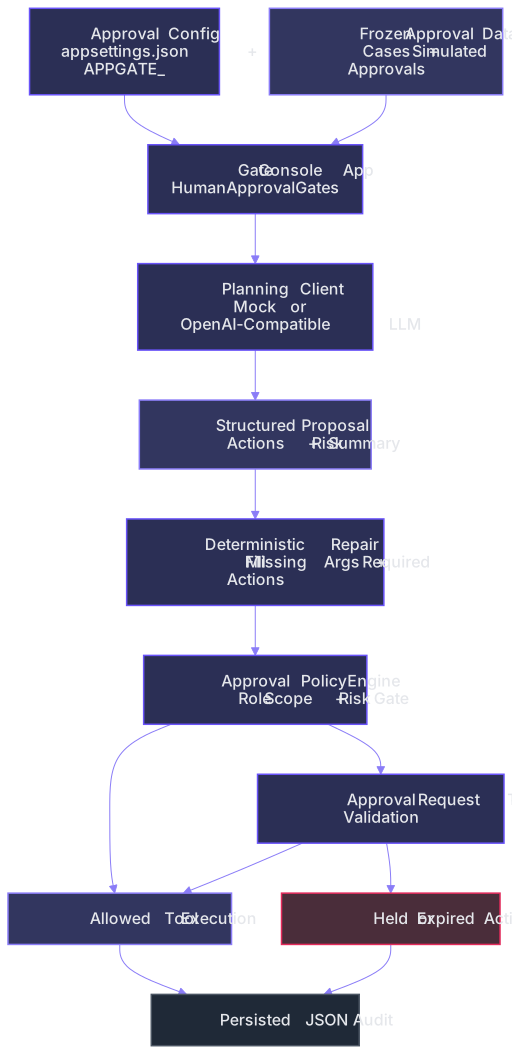
The architecture is intentionally small. A frozen dataset feeds the workflow, the planner returns structured actions, and a deterministic repair layer fills missing arguments before policy evaluation. The approval policy then classifies each action as allowed, approval-gated, or blocked. Approved actions execute through the internal tool registry, while gated actions pass through approval request and token validation. The full outcome is then saved as a JSON audit record.
The diagram below shows the high-level control flow:
Runtime Configuration First
The app starts by loading the approval profile before any planning or execution happens:
{
  "App": {
    "DatasetPath": "data/approval_cases.json",
    "AuditDirectory": "data/audits",
    "UseMockModel": false,
    "BaseUrl": "http://localhost:11434/v1",
    "ApiKey": "ollama",
    "ModelId": "qwen3:8b",
    "ModelTimeoutSeconds": 45,
    "ApprovalTokenMinutes": 20,
    "AutonomousRefundLimitUsd": 100
  }
}
The app configuration is loaded once up front:
var config = AppConfig.Load(AppContext.BaseDirectory);
config.Validate();
That matters because approval boundaries are operational boundaries. Dataset path, audit location, token TTL, and autonomous refund threshold all change what the system is allowed to do.
The Workflow Replays Frozen Approval Cases
This sample does not hide the approval logic behind an interactive console. It replays a deterministic JSON case set:
{
  "caseId": "HAG-003",
  "title": "Production rollback with valid approval",
  "operatorRole": "OperationsLead",
  "accountId": "OPS-NA",
  "userRequest": "Rollback the checkout release for service checkout-api in environment prod for release 2026.06.12.3 because customer errors are rising.",
  "requestedAtUtc": "2026-06-12T08:10:00Z",
  "simulatedApproval": {
    "mode": "ApproveImmediately",
    "approvedBy": "release-manager",
    "decisionNote": "Approved because the rollback matches the incident playbook.",
    "decisionDelayMinutes": 2,
    "validationDelayMinutes": 5
  }
}
That is a better fit for this topic than a chat loop. Approval behavior becomes inspectable because the same cases can be replayed every time.
The Planner Proposes Actions, It Does Not Execute Them
The checked-in runtime defaults to a live OpenAI-compatible local model endpoint, but the workflow still keeps a deterministic mock planner available for offline replay and tests:
public interface IPlanningModelClient
{
  Task<PlanningProposal> PlanAsync(ApprovalCaseFile caseFile, CancellationToken cancellationToken = default);
}
The proposal shape is small and explicit:
{
  "summary": "string",
  "riskSummary": "string",
  "customerReplyDraft": "string",
  "proposedActions": [
    {
      "toolName": "Billing.IssueRefund",
      "reason": "string",
      "arguments": {
        "accountId": "ACC-2048",
        "amountUsd": "48.00",
        "reason": "duplicate_charge"
      }
    }
  ]
}
This is the important separation. The model can interpret the request and propose a bounded action set, but it never gets to define execution semantics by itself.
Proposals Are Normalized Before Policy Evaluation
Duplicate tool calls and noisy arguments are merged before the approval layer sees them:
if (merged.TryGetValue(normalized.ToolName, out var existing))
{
  merged[normalized.ToolName] = Merge(existing, normalized);
}
else
{
  merged[normalized.ToolName] = normalized;
}
That keeps the approval path stable. The policy engine evaluates one normalized action per tool instead of trying to infer intent from repeated or malformed proposals.
Malformed Planner Output Is Repaired Before It Reaches Policy
The live planner can still omit required fields or skip one of the bounded actions the workflow expects. The repair layer deterministically merges the planner output with the canonical case-shaped action set:
foreach (var canonicalAction in canonical.ProposedActions)
{
  if (merged.TryGetValue(canonicalAction.ToolName, out var existing))
  {
      merged[canonicalAction.ToolName] = Merge(existing, canonicalAction);
  }
  else
  {
      merged[canonicalAction.ToolName] = canonicalAction;
  }
}
Missing arguments are backfilled from the deterministic case parser:
if (!mergedArguments.TryGetValue(pair.Key, out var currentValue) || string.IsNullOrWhiteSpace(currentValue))
{
  mergedArguments[pair.Key] = pair.Value;
}
That is the difference between a fragile demo and a production-shaped boundary. The model can still contribute the summary and the initial tool suggestion, but code repairs incomplete execution details before the approval gate sees them.
Tool Names Become Internal Scopes
The registry defines the only tool surface the workflow is allowed to execute:
new ToolDefinition
{
  Name = "Billing.IssueRefund",
  Scope = ToolScope.IssueRefund,
  RequiredArguments = ["accountId", "amountUsd", "reason"]
},
new ToolDefinition
{
  Name = "Ops.RollbackDeployment",
  Scope = ToolScope.RollbackDeployment,
  RequiredArguments = ["serviceName", "environment", "releaseId"]
},
new ToolDefinition
{
  Name = "Data.ExportCustomerData",
  Scope = ToolScope.ExportCustomerData,
  RequiredArguments = ["accountId", "exportType"]
}
Operator roles then map to deterministic scope sets:
OperatorRole.FinanceAnalyst =>
[
  ToolScope.SearchKnowledgeBase,
  ToolScope.ReadCustomerAccount,
  ToolScope.IssueRefund
],
OperatorRole.OperationsLead =>
[
  ToolScope.SearchKnowledgeBase,
  ToolScope.RollbackDeployment
],
This is the core boundary. A model may emit a known tool name, but it cannot invent a new execution surface or give a role access it does not already have in code.
High-Risk Actions Create Approval Requests
The approval policy decides which actions can run autonomously and which ones need a human gate:
return definition.Scope switch
{
  ToolScope.IssueRefund => EvaluateRefund(proposal),
  ToolScope.RollbackDeployment => ApprovalRequired(definition.Scope, "Production rollback requires approval."),
  ToolScope.ExportCustomerData => ApprovalRequired(definition.Scope, "Customer data export requires approval."),
  ToolScope.ChangeCustomerPlan => ApprovalRequired(definition.Scope, "Customer-impacting plan changes require approval."),
  _ => new ToolAuthorizationResult
  {
      Decision = ToolDecision.Allowed,
      Reason = "Tool is inside the autonomous role scope.",
      Scope = definition.Scope
  }
};
Refunds have one more deterministic gate: the autonomous threshold.
if (amount > _config.AutonomousRefundLimitUsd)
{
  return ApprovalRequired(
      ToolScope.IssueRefund,
      $"Refund exceeds the autonomous limit of ${_config.AutonomousRefundLimitUsd:F2}.");
}
This is a standard industry pattern. The same role can execute some refunds immediately while larger refunds remain approval-gated under the same workflow.
Approval Tokens Are Scoped and Expire
When a high-risk action needs approval, the workflow creates a request with an explicit expiry window:
return new ApprovalRequest
{
  RequestId = $"APR-{_requestSequence:0000}",
  CaseId = caseId,
  RequestedByRole = requestedByRole,
  Scope = scope,
  ToolName = toolName,
  Reason = reason,
  CreatedAtUtc = nowUtc,
  ExpiresAtUtc = nowUtc.AddMinutes(_config.ApprovalTokenMinutes),
  Status = ApprovalRequestStatus.Pending
};
Approved requests then issue a scoped token:
var token = new ApprovalToken
{
  TokenId = $"APT-{_tokenSequence:0000}",
  RequestId = request.RequestId,
  CaseId = request.CaseId,
  IssuedToRole = request.RequestedByRole,
  Scope = request.Scope,
  ExpiresAtUtc = request.ExpiresAtUtc
};
Validation is deterministic and fail-closed:
if (token.Scope != requiredScope)
{
  return new TokenValidationResult
  {
      IsValid = false,
      Reason = $"Approval token {token.TokenId} does not grant scope {requiredScope}."
  };
}

if (nowUtc > token.ExpiresAtUtc)
{
  return new TokenValidationResult
  {
      IsValid = false,
      Reason = $"Approval token {token.TokenId} expired at {token.ExpiresAtUtc:yyyy-MM-dd HH:mm} UTC."
  };
}
That is what makes the approval artifact real. It is not a vague boolean. It is a bounded credential tied to one case, one role, one scope, and one validity window.
Only Approved Tools Execute
The engine does not execute a gated action until the token passes validation:
if (!validation.IsValid)
{
  executions.Add(new ToolExecutionRecord
  {
      ToolName = action.ToolName,
      Scope = requiredScope,
      Decision = ToolDecision.ApprovalRequired,
      Reason = validation.Reason,
      ApprovalRequestId = request.RequestId,
      ApprovalTokenId = simulation.Token.TokenId
  });

  continue;
}
Only then does the tool registry run the action:
executions.Add(new ToolExecutionRecord
{
  ToolName = action.ToolName,
  Scope = requiredScope,
  Decision = ToolDecision.Allowed,
  Reason = validation.Reason,
  Output = _toolRegistry.Execute(action),
  ApprovalRequestId = request.RequestId,
  ApprovalTokenId = simulation.Token.TokenId
});
That is the right control order. Proposal first, approval second, execution last.
Audit Records Preserve the Full Decision Path
Every run is persisted as one JSON audit document:
var auditRecord = new AuditRecord
{
  AuditId = $"{caseFile.CaseId}-{caseFile.RequestedAtUtc:yyyyMMddHHmmss}-{_auditSequence:000}",
  CaseId = caseFile.CaseId,
  Title = caseFile.Title,
  OperatorRole = caseFile.OperatorRole,
  CreatedAtUtc = caseFile.RequestedAtUtc,
  Proposal = proposal,
  ApprovalRequests = approvalRequests,
  ApprovalDecisions = approvalDecisions,
  Executions = executions,
  FinalCustomerReply = _finalReplyPolicy.Build(caseFile, executions)
};
A saved rollback audit from the sample includes the proposal, approval decision, and approved execution in one place:
{
  "caseId": "HAG-003",
  "approvalRequests": [
    {
      "requestId": "APR-0002",
      "scope": "RollbackDeployment",
      "reason": "Production rollback requires approval."
    }
  ],
  "approvalDecisions": [
    {
      "requestId": "APR-0002",
      "decisionType": "Approved",
      "decidedBy": "release-manager"
    }
  ],
  "executions": [
    {
      "toolName": "Ops.RollbackDeployment",
      "decision": "Allowed",
      "reason": "Approval token APT-0001 satisfied the policy gate.",
      "approvalTokenId": "APT-0001"
    }
  ]
}
That is the operational value of the sample. The approval state is not hidden inside chat history or in-memory state. It is durably inspectable after the run finishes.
Walking a Real Live Run
A deterministic local run on 2026-06-12 produced:
Human Approval Gates
Dataset: data/approval_cases.json
Cases: 4

HAG-001 | Autonomous duplicate-charge refund
Role: FinanceAnalyst
- Proposed actions: 3
- Approval requests: 0
- KnowledgeBase.Search -> Allowed (Tool is inside the autonomous role scope.)
- CustomerAccount.Read -> Allowed (Tool is inside the autonomous role scope.)
- Billing.IssueRefund -> Allowed (Refund is inside the autonomous threshold.)

HAG-002 | Large refund without approval
Role: FinanceAnalyst
- Proposed actions: 3
- Approval requests: 1
- Billing.IssueRefund -> ApprovalRequired (Approval request APR-0001 is pending.)

HAG-003 | Production rollback with valid approval
Role: OperationsLead
- Proposed actions: 2
- Approval requests: 1
- Ops.RollbackDeployment -> Allowed (Approval token APT-0001 satisfied the policy gate.)

HAG-004 | Customer data export with expired token
Role: SupportSupervisor
- Proposed actions: 3
- Approval requests: 1
- Data.ExportCustomerData -> ApprovalRequired (Approval token APT-0002 expired at 2026-06-12 08:35 UTC.)
How to interpret this:
- The finance workflow can still execute a bounded refund autonomously when it stays under the configured threshold
- The same finance role is blocked from executing a larger refund until human approval exists
- The operations rollback only becomes executable after a valid scope-matched approval token is present
- The privacy export remains non-executable even after approval was once granted, because the token expired before validation
That is the intended behavior. The workflow is not anti-automation. It is selective automation with an explicit approval contract for the actions that actually matter.
Why This Architecture Works
The workflow works because the planner, the approval gate, and the execution layer have different responsibilities on purpose:
- The planner interprets the case and proposes bounded tool actions
- The normalization layer stabilizes the proposal before policy reads it
- The approval policy decides whether each action is autonomous, gated, or blocked
- The approval service turns human approval into a scoped expiring artifact that code can validate
- The tool registry executes only after the approval contract is satisfied
- The audit store preserves the whole decision path after execution ends
That is the real boundary here. The model can help decide what should happen next. Deterministic code still owns whether the risky thing is actually allowed to happen.
Potential Enhancements
To extend this project further, you can consider:
- Replace simulated approvals with signed approval artifacts or durable workflow records
- Add argument-level validation for sensitive tools such as allowed export types or rollback environments
- Extend the frozen dataset with rejected approvals and mixed-action cases
- Persist richer audit metadata such as prompt versions, latency, and policy version identifiers
- Add live integration tests against a local OpenAI-compatible endpoint in addition to the deterministic mock path
Final Notes
Approval gates are not there to make an AI workflow look less autonomous. They are there to keep the high-risk parts of autonomy shaped like software instead of shaped like hope.
If the model proposes, the policy layer gates, the approval artifact expires, and the audit trail survives the run, then high-risk AI actions remain understandable even when the workflow is genuinely useful.
Explore the source code at the GitHub repository.
See you in the next issue.
Stay curious.