Most teams still operate coding agents like an interactive terminal. They write a prompt, wait for output, inspect the result, add more context, and ask for the next step.
That works for supervised work, but it does not scale into an operating model. The model may be fast, but the workflow still runs at the speed of the person who keeps restarting it. A better prompt does not fix that boundary. It only improves one turn inside a process that still depends on human attention for every next move.
Loop engineering changes the unit of design. Instead of designing one instruction for one agent run, you design the system that finds work, starts the agent, checks the result, remembers what happened, and stops when the loop has either succeeded or reached a boundary. This issue builds that control plane as a markdown-first companion artifact: a loop spec, state file, gates, budgets, and escalation rules that can be adapted to real engineering workflows.
The Artifact
You are building a bounded operating model for recurring AI agent work:
- A loop spec that defines purpose, trigger, inputs, work selection, roles, gates, budgets, and stop conditions
- A persistent state file that survives outside the model conversation
- A maker-checker split so the agent that produces the work is not the only one judging it
- Deterministic gates for build, tests, lint, schema validation, link checks, and scope checks
- Escalation rules for ambiguity, repeated failure, high-risk actions, and exhausted budgets
- A rollout path that starts in shadow mode before the loop is allowed to open pull requests or modify shared systems
This is a markdown-first issue because the artifact itself is the product. Before you need a custom orchestrator, you need the files that define what the loop is allowed to do.
From Prompt to Loop
Prompt engineering optimizes one model interaction. Context engineering improves what the model sees during that interaction. Agent engineering gives the model tools and a runtime. Loop engineering sits one layer higher: it decides when the agent should run, which work it should attempt, how output is judged, and what happens after each attempt.
That distinction matters because a loop has responsibilities a prompt does not have:
- It needs a trigger, not just an instruction
- It needs work selection, not just broad intent
- It needs stop conditions, not just a goal
- It needs durable state, not just chat history
- It needs verification, not just generated confidence
- It needs budgets, because repeated agent runs can become expensive quickly
A loop is closer to a production job than a conversation. Treating it as a conversation is how you get unattended drift, noisy pull requests, runaway token spend, and changes nobody wants to review.
The Control Plane
The companion repo defines the loop as a small control plane. The diagram below shows how the trigger, spec, state, maker, checker, gates, budgets, and escalation path fit together.
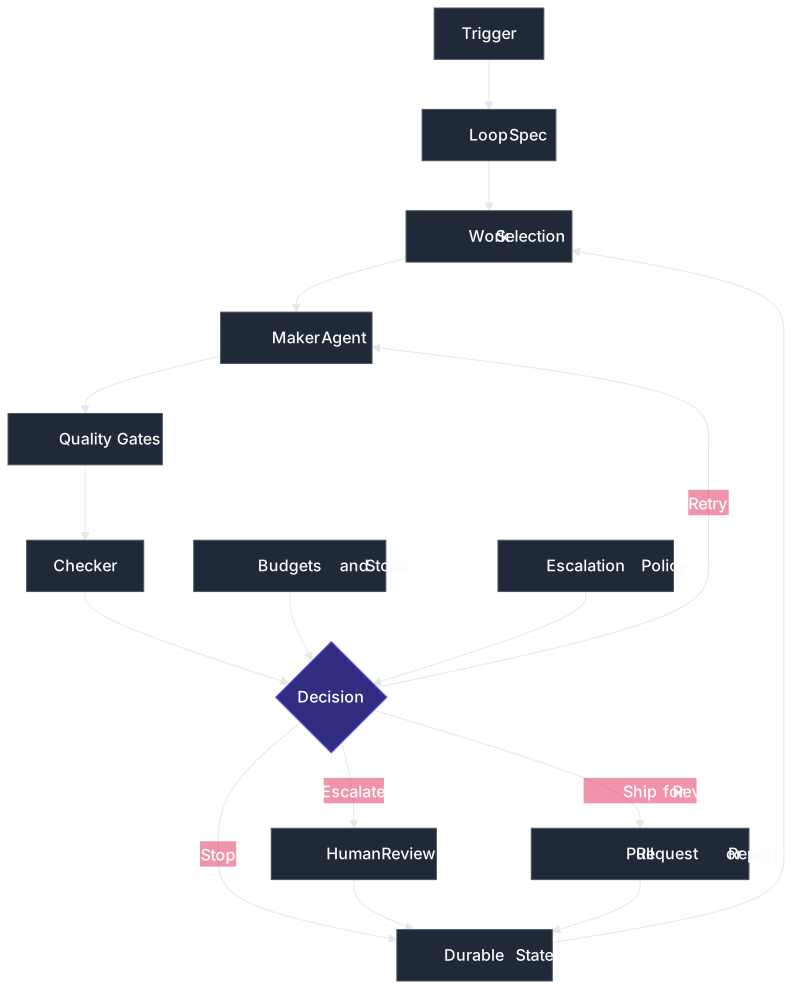
The underlying files keep those responsibilities separate:
LOOP_SPECdefines the recurring workflowLOOP_STATErecords what happened across runsquality-gate-checklistdefines completion criteriaescalation-policydefines where autonomy stopsloop-readinessprevents teams from automating work that is not ready to be automated
This is the same discipline used in earlier issues for specs, repository instruction files, approval gates, model upgrade gates, and prompt lineage. The loop is new, but the engineering posture is not: make the boundary explicit before the model starts acting.
Spec Before Automation
A loop should not be launched from a vague scheduled prompt. It should load a spec that can be reviewed like any other operational artifact.
# Loop Spec: Repository Maintenance Triage

## Purpose

Find small repository maintenance tasks, draft safe fixes, verify them, and
prepare pull requests for human review.

## Trigger

Run every weekday at 08:00 local time.

## Work Selection Rules

The loop may select work only when:

- the issue is labeled maintenance
- the expected file changes are below five files
- no production secret, billing flow, or deployment setting is involved
- the definition of done can be checked with tests, lint, schema validation, or
link validation

The loop must skip and escalate when:

- requirements are ambiguous
- the change touches authentication, authorization, payments, or data deletion
- the same item failed twice before
- required tests are missing or failing before the change starts
The spec does not tell the agent "be careful." It defines exactly which work can enter the loop and which work must leave the loop. That is the difference between autonomy and unattended guessing.
Maker and Checker
The first loop is the maker loop. It inspects the task, edits files, runs commands, responds to errors, and iterates until it believes the work is complete.
That is not enough. The maker loop must be wrapped by a verification loop that decides whether the output is allowed to move forward. The checker can be deterministic code, a separate model, a separate agent, or a human. The important rule is that the maker does not get the final vote alone.
This is where loop engineering becomes production engineering. The model can propose. The gate decides.
Start Closed
The practical starting point is a closed loop. A closed loop has a narrow job, a known input source, a definition of done, hard budgets, and a stop condition. It may still use a capable model, tools, and multiple attempts, but it operates inside a frame you defined.
Good first loops look like this:
- Daily issue triage that writes a report but does not change code
- Documentation link repair that opens a pull request after link checks pass
- CI failure grouping that reproduces one low-risk failure and escalates the rest
- Dependency update preparation that runs tests and leaves a reviewable diff
- Prompt eval replay that reports regressions without changing production prompts
Open-ended loops are a later step. A loop that can roam a large codebase, spawn many helpers, and pursue a broad goal may be powerful, but it is also harder to verify and easier to waste. Start with work that repeats and can be checked.
Memory Outside Chat
A loop that does not write state starts cold every time. It rediscovers the same constraints, repeats the same failed attempts, and forces the prompt to carry history that should live in the repository or task system.
The companion repo uses a simple markdown state file:
# Loop State: Repository Maintenance Triage

## Current Run

- run_id: 2026-07-04T080000Z
- mode: shadow
- selected_items: 2
- opened_pull_requests: 0
- escalations: 1

## Items

### MT-104

- status: escalated
- reason: touches authentication middleware
- attempts: 0
- next_action: human review required before agent work

### MT-117

- status: drafted
- reason: stale documentation links
- attempts: 1
- gates:
- link check: passed
- docs lint: passed
- scope check: passed
- next_action: human review
This looks simple because it should be simple. The durable state does not need to be clever. It needs to be inspectable, versionable, and available to the next run.
Budgets and Stops
A loop without budgets is an open tab on your model account. Agentic workflows make many model calls: planning, tool use, retries, validation, summarization, review, and final reporting. A scheduled loop multiplies that by time.
The loop spec should make budgets visible:
## Budgets

- max iterations: 3
- max tool calls per iteration: 20
- max runtime: 30 minutes
- max pull requests per run: 2

## Stop Conditions

Stop when one of these is true:

- all selected work items are completed or escalated
- max iterations are reached
- cost or runtime budget is exhausted
- the checker reports no progress across two consecutive attempts
- a required gate fails for an environmental reason
Budgets are not just cost controls. They are reliability controls. If a loop cannot make progress inside a bounded number of attempts, the next correct action is usually not another prompt. It is escalation.
Gates That Hold
A loop creates leverage only when the gate is stronger than the generation layer. Otherwise, it just produces more material for humans to clean up.
The gate should prefer checks the model cannot talk its way around:
- Build passes
- Relevant tests pass
- Lint or formatting passes
- Schemas validate
- Generated artifacts are up to date
- Documentation links resolve
- Diff stays within allowed paths
- No forbidden files changed
A separate model reviewer can help with judgment, but it should sit beside deterministic gates, not replace them. If correctness can be checked by code, let code check it.
Escalation by Design
A production loop should not treat human involvement as an exception. It should know exactly when to stop and ask.
## Always Escalate

- production secrets
- billing or refunds
- authentication
- authorization
- data deletion
- infrastructure credentials
- deployment configuration
- legal, compliance, or security policy changes

## Escalate On Ambiguity

Escalate when:

- the issue lacks acceptance criteria
- tests disagree with documentation
- the checker reports uncertain correctness
- the loop needs context from a person or private system
- two retries fail for the same reason
This keeps the loop honest. The goal is not to remove engineers from the system. The goal is to move engineers to the points where their judgment changes the outcome.
Rollout Path
Do not start by giving an agent a wide goal and a production connector. Start with a controlled rollout. The diagram below shows the path from manual operation to narrow autonomy, including the rollback points when the loop becomes noisy, unsafe, or too expensive to review.
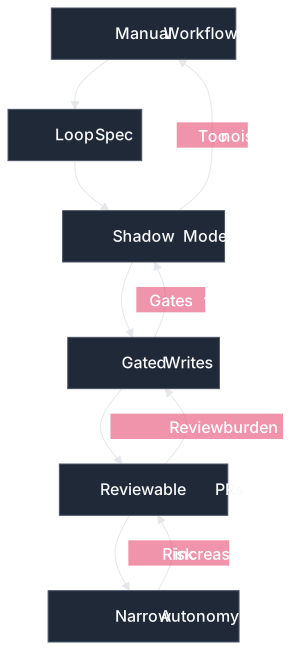
That rollout path is slower than the demos, but it matches how production systems should absorb automation. First observe. Then gate. Then expand authority.
Why It Works
The control plane works because each part has a separate responsibility:
- The trigger decides when the loop starts
- The spec decides what work is allowed
- The isolated workspace prevents parallel work from colliding
- The maker produces a candidate change
- The gates decide whether the candidate is acceptable
- The state file records what happened for the next run
- The escalation policy preserves human judgment at the boundary
That separation keeps the probabilistic layer useful without letting it own the whole system. The model performs work. The loop controls work.
Next Steps
To extend this project further, you can consider:
- Add a concrete GitHub Actions workflow that runs the shadow loop on a schedule
- Add a small .NET or Python runner that reads
LOOP_SPEC.mdand enforces budgets before invoking an agent runtime - Persist run reports as JSON so loop quality can be trended over time
- Add model routing so cheap classification steps use a smaller model and final review uses a stronger model
- Add approval gates for high-risk connector calls such as ticket updates, pull request creation, or production API access
Final Notes
Loop engineering is not a license to automate everything. It is a way to make repeated agent work explicit enough to trust, inspect, and improve.
The useful shift is not from human to agent. It is from human-operated prompts to engineered control loops. Once the trigger, spec, gate, state, budget, and escalation path are visible, the loop becomes something you can review like software instead of something you hope the model handles responsibly.
Explore the source code at the GitHub repository.
See you in the next issue.
Stay curious.
Join the Newsletter
Subscribe for AI engineering insights, system design strategies, and workflow tips.